How to add phone OTP login to your Shopify store
Passwords are where accounts go to die. Here is how Shopify OTP login works, why phone codes suit Indian shoppers, and how to switch it on without touching your theme.
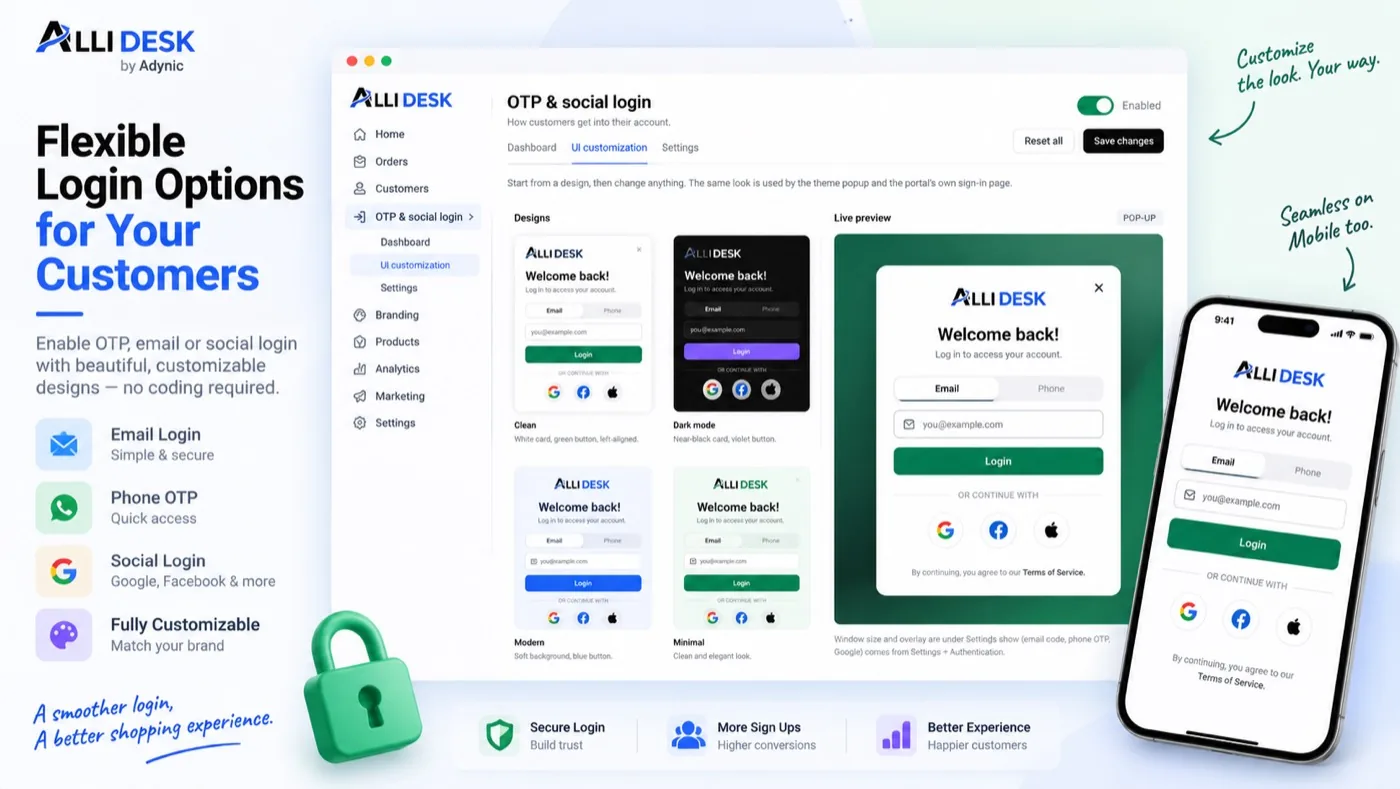
Ask a shopper to create a password and many of them simply leave. They already have too many, they will forget this one, and they came to buy a kurta, not to open an account. Shopify OTP login removes that step: the shopper types a phone number or an email address, gets a one-time code, and is signed in.
This guide covers how one-time-code sign-in works on Shopify, why the phone number matters so much for Indian stores, and how to set it up with AlliDesk's login module without editing your theme's code.
Why Shopify OTP login beats passwords
A password asks the customer to remember something. A code asks them to receive something, on a device they already have in their hand. That difference shows up everywhere an account matters:
Checkout and reorders. A signed-in customer sees saved addresses, past orders and one-tap reorder instead of starting again.
Order tracking without calls. Customers who can get into their account look up their order themselves instead of messaging you.
Loyalty and wishlists. Points and saved items only work when the shopper can find their way back to the same account.
Fewer forgotten-password emails. There is no password to forget, so there is no reset flow to fail.
Phone number or email: what Indian shoppers expect
Shopify's own login asks for an email address. Many Indian shoppers, especially outside the metros, think of their phone number as their identity: it is what they give a courier, a bank and every app on their phone. Asking for it at sign-in matches how they already shop.
With AlliDesk, a shopper can choose either. A phone code is sent on WhatsApp first, and by SMS if WhatsApp does not get through. Email codes go to the inbox as usual. Stores can also offer Google sign-in for shoppers who prefer it.
How to set up OTP login on Shopify, step by step
Install AlliDesk from the Shopify App Store and open it from your Shopify admin.
Switch on the theme app embed. In AlliDesk go to Settings → Integrations → Theme app embed and press Turn on in theme editor, then Save in Shopify's editor. This is the one switch that lets AlliDesk open its sign-in window from your theme's login and account links. Nothing in your theme's code changes.
Switch on OTP & social login and choose the ways shoppers can sign in: email code, phone code, or both, plus Google if you want it.
Style the sign-in window under UI customization so it uses your fonts, colours and logo.
Test it before shoppers do. Turn on Testing mode: for 24 hours the code is shown on screen and nothing is sent, so you can try every path on your own storefront.
Turn Testing mode off, and real codes start going out.
Tip: Phone codes are included on every AlliDesk plan, the Free plan too, so there is no separate SMS account or DLT registration to set up first. See pricing.
What customers get once they are signed in
Signing in is only worth it if there is something on the other side. After a code, the shopper lands in an account page on your own store domain with their orders and tracking, cancellations inside the window you set, returns and exchanges, invoices, wishlist and points, whichever modules you have switched on. It takes its look from your store's branding, so it reads as part of your shop rather than a third-party page.
Common questions
Does OTP login work with Shopify's new customer accounts?
Yes. Stores on new customer accounts keep Shopify's own email-code login, and AlliDesk adds phone codes and Google on top. The account page, wishlist, points and returns work the same way.
Do I need to edit my theme?
No. Everything goes through the theme app embed and app blocks, which you switch on in Shopify's theme editor. Switching the embed off removes AlliDesk from the storefront completely.
What happens if WhatsApp does not deliver the code?
The code is sent again by SMS, so a shopper without WhatsApp can still sign in.
Give shoppers a sign-in they will actually use Phone and email codes, Google sign-in and a customer account page, on any Shopify theme. Install AlliDesk →
Put this to work on your store
AlliDesk brings sign-in, loyalty, returns and GST invoices into one Shopify app, on any theme.