HSN codes on Shopify invoices: set them once for every product
Every line on a GST invoice needs an HSN code, and Shopify's order confirmation carries none. How many digits you need, and how to set codes for a whole catalogue.
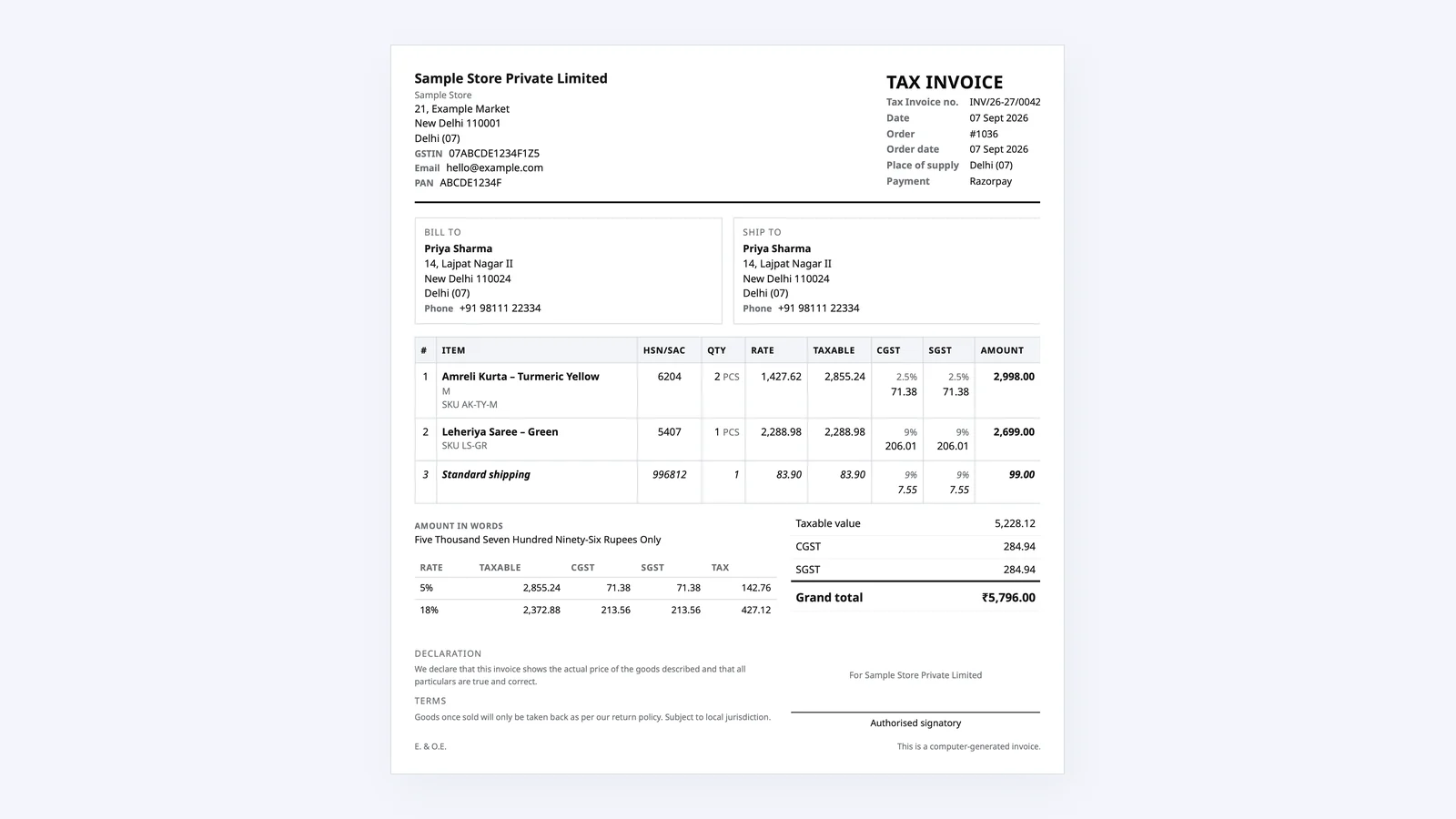
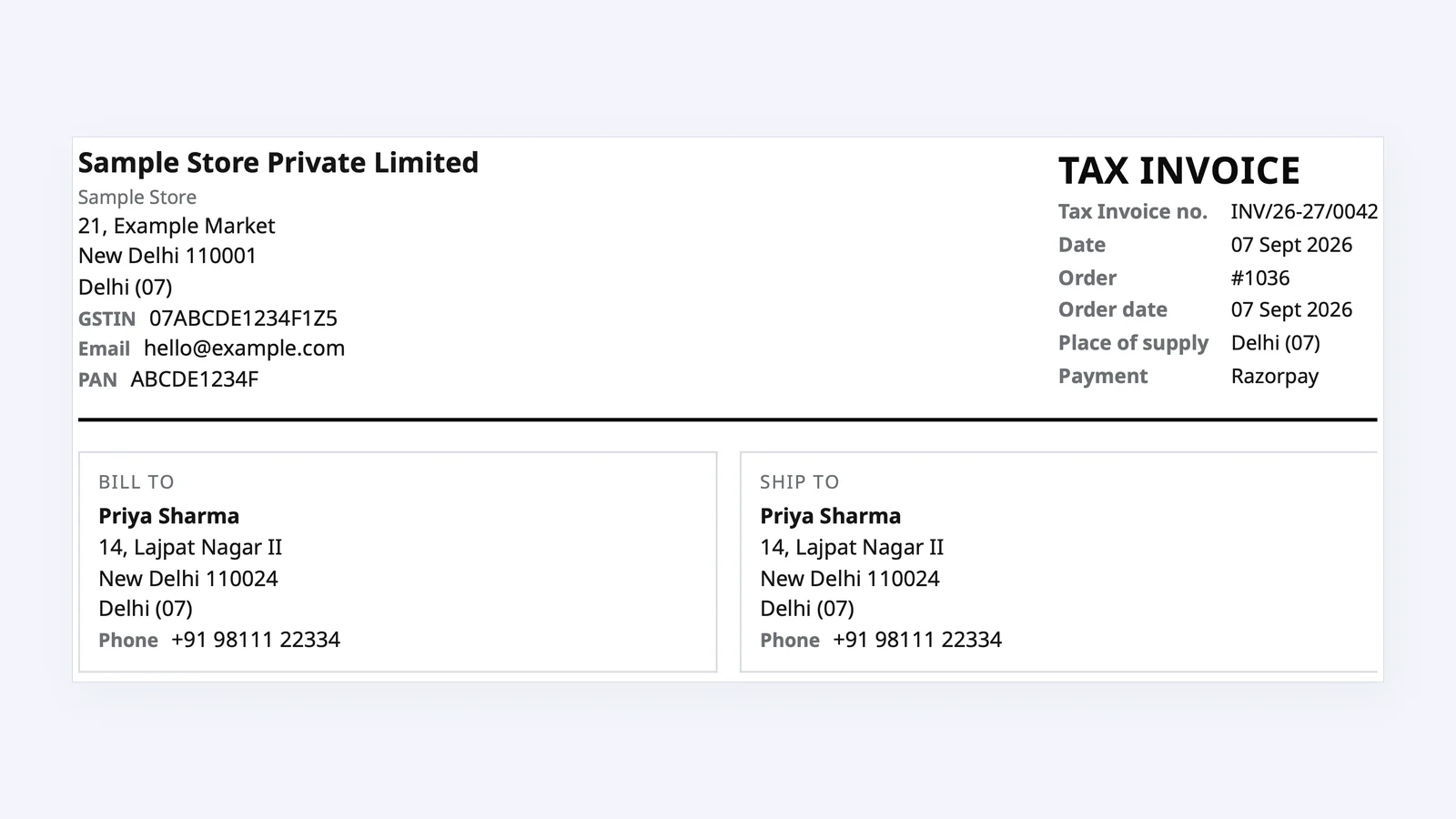
An HSN code tells the tax department what you sold, and it decides the GST rate. Every line on a GST invoice from your Shopify store needs one, but Shopify's order confirmation is not a GST invoice and prints no HSN code at all. So the HSN code on a Shopify invoice usually ends up typed by hand, guessed, or missing.
This guide covers what an HSN code is, how many digits your invoices need, and how to set codes for a whole catalogue without touching every order.
Note: This is a practical guide, not tax advice. Confirm the codes and rates for your products with your chartered accountant.
What an HSN code is
HSN stands for Harmonised System of Nomenclature, an international way of classifying goods. India uses it under GST: each code points to a kind of product, and the GST rate follows from the code. Services use a similar code called SAC (Services Accounting Code), which is why invoices often head the column "HSN/SAC".
The first two digits are the chapter, and each further pair narrows it down. A few chapters most Shopify stores in India sell from:
Chapter 61: clothing that is knitted or crocheted, such as T-shirts and most activewear.
Chapter 62: clothing that is not knitted, such as woven shirts, kurtas and trousers.
Chapter 64: footwear.
Chapter 33: perfumes, cosmetics and skin care.
Chapter 71: jewellery, including imitation jewellery.
Your CA, or the HSN search on the GST portal, will give you the exact code for each product type.
How many digits the HSN code on a Shopify invoice needs
The number of digits depends on your aggregate turnover in the previous financial year:
Up to ₹5 crore: a 4-digit HSN code on invoices to registered businesses (B2B). On invoices to consumers it is optional, though printing it costs nothing and keeps your records consistent.
Above ₹5 crore: a 6-digit HSN code on every invoice.
The same codes feed the HSN summary you file with GSTR-1, so a missing or wrong code shows up twice: on the invoice and in the return.
Why HSN codes are hard to keep on Shopify
Shopify was not built around Indian GST. A product does have an HS code box under its customs information, but that is meant for international shipments, and nothing in Shopify prints it on an Indian tax invoice. Stores work around this in a few ways, and each has a catch:
A spreadsheet of SKUs and codes, looked up when invoices are made. It works until the catalogue grows.
The code in the product type or a tag. Then nothing stops a new product going live without one.
A code per order, typed at invoice time. Slow, and two people will type two different codes for the same kurta.
What you want is one place that holds a code and a rate for every product, a default for anything you forgot, and an invoice that reads from it on every order.
Setting HSN codes for a whole catalogue in All iDesk
In All iDesk the codes live under GST → GST & HSN. A rule holds the HSN code and the GST rate, plus cess and the unit of measure where you need them. Rules sit at three levels, and the most specific one wins:
A product rule, for the product that is different from everything around it.
A collection rule, so a collection such as "Kurtas" or "Footwear" carries one code for everything in it.
The store default, for anything the two above do not cover.
Most stores need one store default and a handful of collection rules. For a long list, select the products and apply one code to all of them at once, or export the list as CSV, fill in the codes in a spreadsheet and import it back.
A rule can also switch to a different rate above a selling price you set, for categories where the GST rate depends on the price, and it can carry a "valid from" date, so a rate change does not rewrite older invoices.
What happens when a product has no HSN code
An order is never held up because a code is missing. The invoice is still issued with the rate from your rules, and the product appears under a Missing HSN tab on the GST & HSN page so you can fix it. Clear that tab before you file, since the HSN summary in GSTR-1 needs a code on every line.
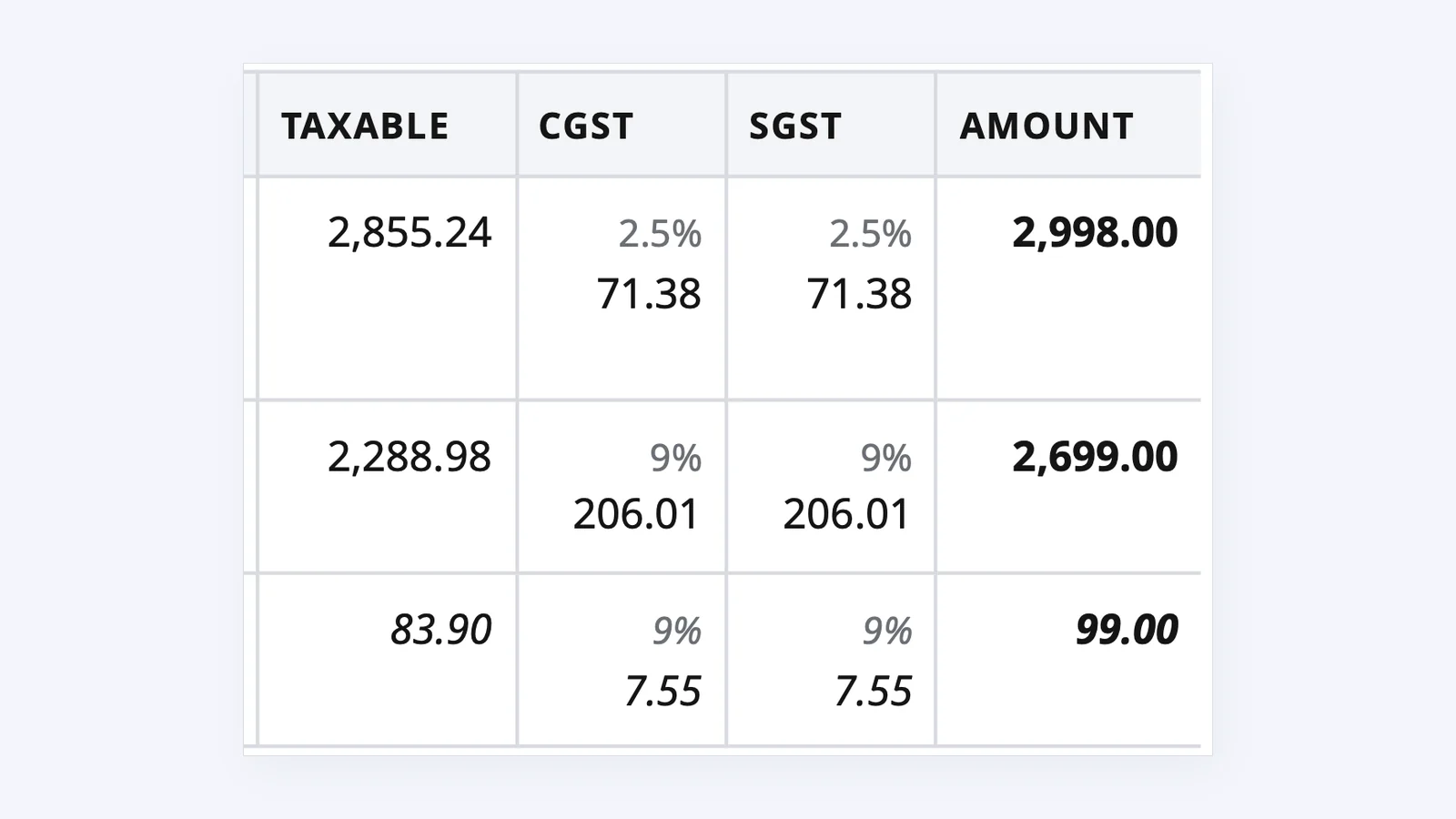
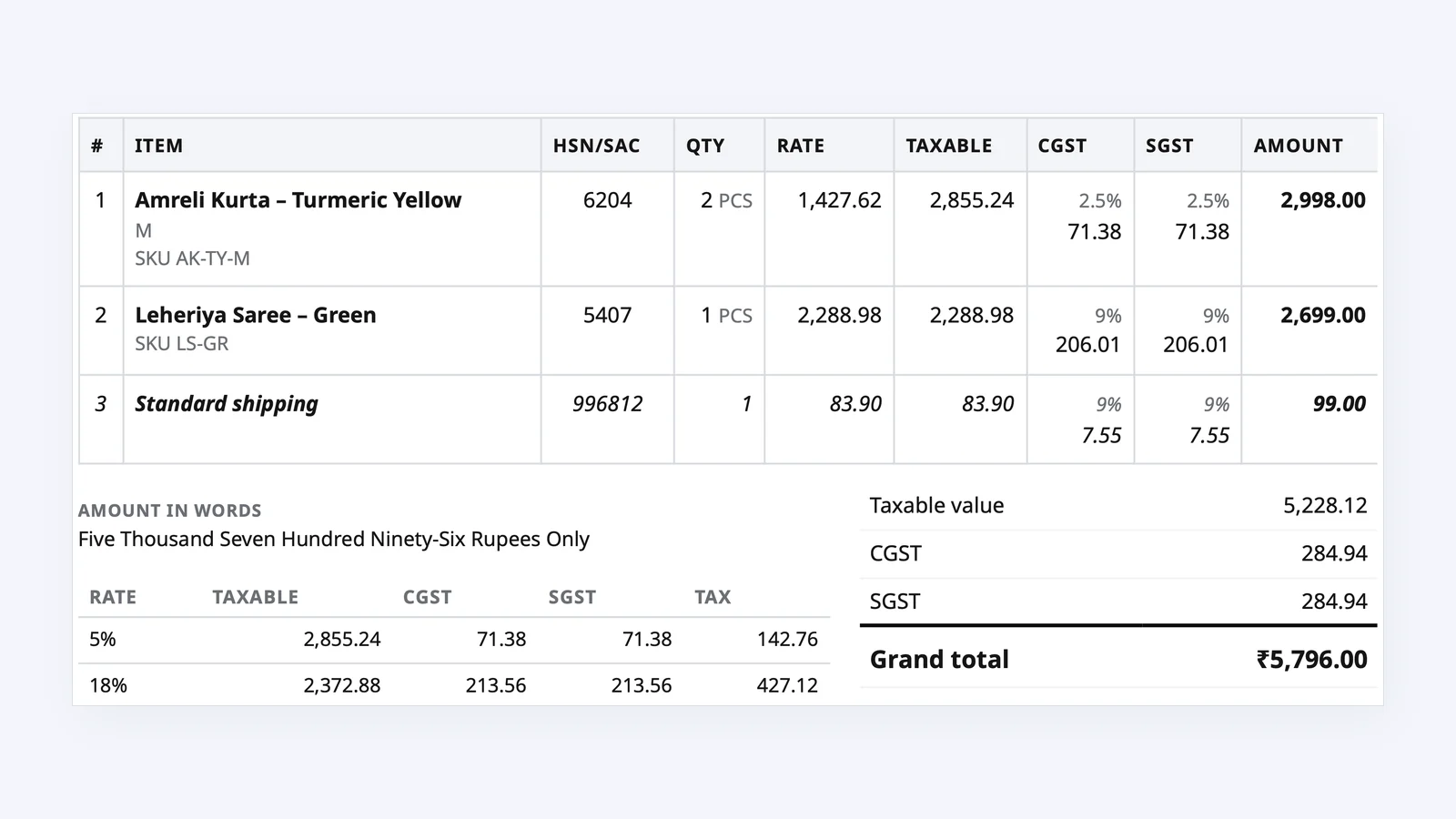
Shipping gets its own code. All iDesk prints SAC 996812, the code for courier services, on the shipping line and taxes it at the highest rate on the order by default; you can set a fixed rate or zero instead.
The rest of the invoice, from the tax split to numbering and credit notes, is covered in GST invoices on Shopify: what every Indian store needs to include, and the split itself in CGST and SGST or IGST: how a Shopify order gets the right GST.
Common questions
Can I use the HS code from Shopify's customs information?
That box is for customs on international shipments. All iDesk keeps its own HSN rules by product, collection and store, so set the code there. The first six digits of an Indian HSN code usually match the international HS code.
How many HSN digits do I need?
With a turnover of up to ₹5 crore in the previous year, 4 digits on invoices to registered businesses. Above ₹5 crore, 6 digits on every invoice.
Can products in the same collection have different GST rates?
Yes. A product rule overrides the collection rule, so one product can carry its own code and rate while the rest of the collection follows the collection's rule.
What is SAC 996812 on the shipping line?
It is the services code for courier services. All iDesk uses it for the shipping charge on the invoice, which is taxed along with the goods.
Set every HSN code once. Product, collection and store rules, bulk edits, CSV import, and a Missing HSN list before you file. See the GST module →
Put this to work on your store
All iDesk brings sign-in, loyalty, returns and GST invoices into one Shopify app, on any theme.